
Trusted by thousands of Etsy & Shopify shops
Pay only for what prints.
Square-foot pricing on every transfer. You pay for the exact printed area, never the blank space. Printed and shipped in 1–2 business days.
I have artwork
Upload it, size it, see your exact price.
← 11" →
your design
↑8"↓
Your price, each
—
Save
vs. padded " bucket
✓ Free reprint guarantee
✓ No minimums
✓ No gang-sheet builder
I need a design
Shop 23,823 press-ready transfers.
✓ New drops weekly
✓ Same square-foot pricing
1–2 days
production TAT
fast, standard turnaround
23,823
press-ready designs
new drops added weekly
$6.00
per square foot, all sizes
no padding, no standard-size fees
How it works
Upload. Preview. Print.
No gang-sheet builder. No "guess the size" fees. Send your art, we handle the layout.
01
step↑
Drop file here
Upload your design
Drop PNG, SVG, or PDF. We auto-clean edges, check resolution, and flag any issues before you pay.
02
stepart
See it printed
Instant garment mockup + exact print size locked in. Your private reorder listing is created automatically.
03
step// production● live
QUEUE → printing
PRINT → ✓ done
PACK → shipping
SHIP → arrives Tue
Printed in 1–2 days
Order. We print, pack, and ship in 1–2 business days. Free 2-day shipping on $100+, every time.
How pricing works
Most shops charge flat "sizes".
Most shops charge flat "sizes".
We charge for the actual print.
Your price is the exact printed area of each image at $6.00/sq ft — so you never pay for blank space or "guess the size" padding.
11 × 8" = 88 in² × $0.042/in²
= $3.67 per transfer
= $3.67 per transfer
✓
Square-foot pricing
Charged by exact printed area, not padded templates.
✓
No wasted space
No paying for blank area. No 'standard size' fees.
✓
No builder required
Upload images. We handle spacing + optimization.
Same artwork · 11" × 8" design
Other shops
Padded "11×11" bucket
blank · charged
blank · charged
your art
bucket: 11×11" = 121 in²
You pay$5.04
DTFDesigner
Exact 11×8" print area
your art
exact: 11×8" = 88 in² ✓
no blank space charged
You pay$3.67
Save $1.37 per print · ~27% off on this shape · stacks across your whole order.
Built for repeat sellers
Your best-sellers, one click away.
Every upload becomes a private reorder listing — size, art, and price locked in. When a design sells again, reorder in one tap. No re-uploading, no re-sizing, no guesswork.
✓
Saved sizes & art
Each listing remembers exact dimensions and your approved file.
✓
One-tap repeat orders
Restock in seconds when a design sells through.
✓
Order history & tracking
Every press, in one place — re-run any past job instantly.
Fresh off the press.

Funny Gingerbread Man DTF Transfer
Christmas Sayings

Oh Deer Christmas Reindeer DTF Transfer
Christmas Pets

Retro Christmas Most Wonderful DTF Transfer
Christmas Sayings

Christmas Reindeer DTF Transfer
Christmas Sayings
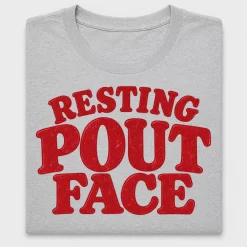
Resting Pout Face DTF Transfer
Funny & Sarcastic
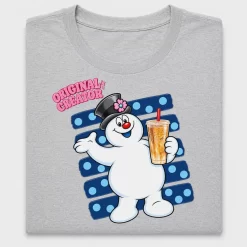
Retro Snowman Coffee DTF Transfer
Christmas Sayings

Sarcastic Christmas Girl DTF Transfer
Christmas for Kids
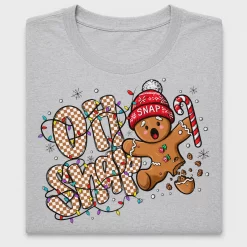
Retro Gingerbread “Oh Snap” DTF Transfer
Christmas Sayings
✓
Free reprint guarantee
If your transfer doesn't press perfectly using our guide, we reprint it. Free. No questions.
✓
$5 sample pack
Try 6 different transfer styles on your fabric of choice. Full credit applied to your first real order.
✓
Real human support
Art review on every order. Reach a print tech in <2 hours, weekdays.
FAQ
Common questions.
Still stuck? Same-day human reply via the contact page.
Do I need to build a gang sheet?+
No. Upload your images and we handle layout/spacing behind the scenes — you still get square-foot (gang-sheet-style) pricing by exact print area.
How does square-foot pricing work?+
Your price is based on the exact printed area of each image and size, at $6.00 per square foot — so you don't pay for blank space or "standard size" padding.
What if my transfer doesn't press well?+
We reprint it. Free. Just send a photo via the order page within 14 days. No questions, no return shipping.
How long until I get my order?+
1–2 business days production (premium TAT). Free 2-day shipping on orders $100 and up. Most orders arrive within 4 days of upload.
How do I press it?+
Pre-press garment 3–5s at 300°F. Apply transfer at 300°F (285°F polyester) for 10–12s, medium pressure. Hot peel. Final press 4–5s with parchment for durability. Full press guide included with every order.
Can I reorder a past design?+
Yes — every order saves a private reorder listing with your art, size, and price locked in. Restock any best-seller in one tap from your account.
Upload → Mockup → Order.
25% off your first order with code FIRST25. Free reprint guarantee on every transfer.
$6.00/sq ft · 1–2-day print
Upload design →